Reservation reminders: a quiet nudge inside your trip plan
Milepost flags every stop that still needs a campground booking, so you do not lose a night to a closed window or a forgotten confirmation.
,4 min read
A part-time RVer plans a six-week loop through three national parks. Two of the campground nights are booked. Four of them are not, because the booking window for those sites does not open for another month. By the time the window opens, the trip is set aside until the next weekend, and the prime sites are gone within the first fifteen minutes.
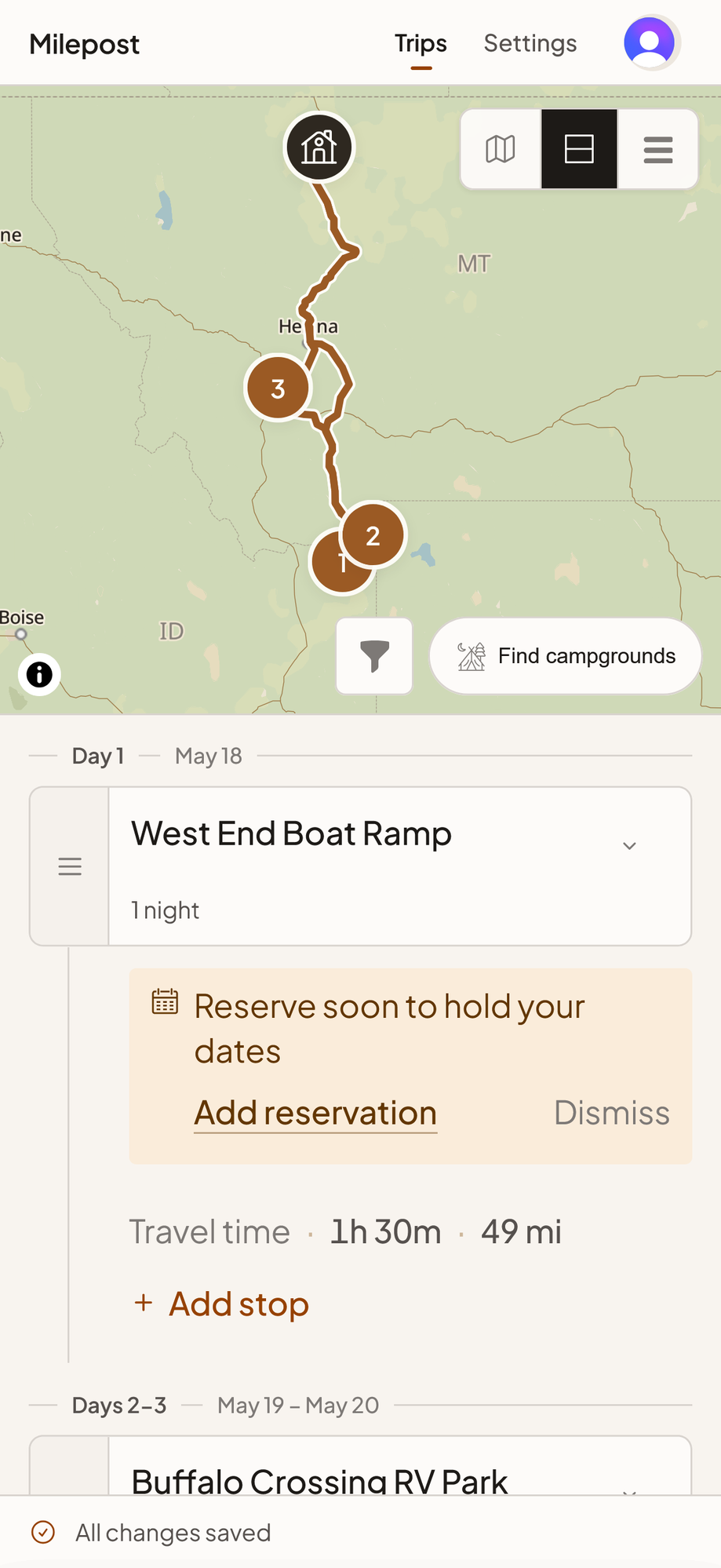
The reservation reminder exists for that month of quiet. It is a small banner on every stop in your Milepost trip that does not yet have a confirmation attached. Not a notification, not an email, not a push alert. A marker inside the trip itself, so the next time you open the plan, the unfinished bookings are the first thing you see.
Why the reminder is there
A trip plan and a trip’s reservations are two different things. The plan is a sequence of stops on a map. The reservations are a stack of confirmation emails in your inbox. Most missed campground nights happen in the gap between them. You finish planning, set the trip aside, and a month later you cannot remember which four of the seven nights are still open.
The reservation reminder closes that gap inside the plan itself. Every stop that still needs a booking carries a visible flag. The flag stays until the night is booked or you decide it does not need to be, so the planning work and the booking work sit on the same page.
The benefit shows up at three moments:
- Right after you plan, when a glance tells you which dates still need attention.
- The morning a booking window opens, when the reminder is the first thing your eye lands on as you open the trip.
- A week before departure, when an unfinished booking is impossible to miss because the flag is still there.
If you booked a night somewhere Milepost does not import from directly, enter the confirmation number on the stop’s edit screen and the reminder goes away.
Why a six-month booking window changes everything
Most popular campgrounds, especially the national park sites managed through Recreation.gov, run a rolling six-month booking window. You can book exactly six months ahead of arrival, not a day sooner. For the most demanded sites (Many Glacier, Watchman at Zion, Apgar at Glacier) the window opens at 8:00 Mountain Time and the prime nights fill within minutes. The 6-month booking window guide covers the morning-of routine.
If your trip is more than six months out, no amount of planning will secure those sites today. The reservation reminder is the running list of which dates still need attention as each window rolls open.
The Recreation.gov import guide covers how to bring those confirmation numbers into the trip once you have them.
When a missing reservation is the right answer
Not every overnight needs a reservation. First-come-first-served campgrounds, BLM dispersed sites, Harvest Hosts overnights, a friend’s driveway: all are legitimate stops with no confirmation to attach. The reminder is a question, not a nag. Tell it “this one does not need a booking” and it stays out of the way for that stop, while every other stop that still needs one keeps its flag.
Why a flag beats a calendar reminder
A calendar reminder fires on a date and disappears. A separate checklist drifts away from the trip. The flag inside the trip plan does neither. It sits next to the stop it concerns, so the context is right there: the dates of the stay, the campground, the legs into and out of it. When a booking window opens, you do not have to go find the trip; the trip is already in front of you with the work to do clearly marked.
A flag also handles decisions that take time. A stop still up in the air, a site you are weighing against an alternate, a booking you are holding off on because the order of stops might move: all keep their flag until you settle it. The flag does not nag and it does not vanish.
On the phone, in the truck, on paper
Milepost is mobile-first. It works on the phone you already have in the truck, so the reminder is visible at the campsite when you are reviewing tomorrow’s plan, not only at a desk. The same flag prints, so a paper copy of the itinerary reflects which nights are still open.
If you are new to trip planning, the first-trip planning guide covers how the reminder sits beside drive-time math and the 330 rule.
Frequently asked questions
Does the reminder send me an email?
No. The reminder lives inside the trip plan and is visible the next time you open it. For a calendar alert on the day a window opens, set one yourself.
What if I do not want any reminders on a trip?
Dismiss them as you go. There is no global toggle, because the value of the marker is the prompt for the specific stop that still needs work.
Can I share my trip with the reminders visible?
Yes. A shared link shows the same reminders the trip owner sees. Useful when a co-planner wants to check whether the booking work is finished without being able to change it.
Milepost is an RV trip planning app for people who want fewer surprises and more time on the road. Free to start, no card.
Plan your first RV trip with Milepost.
Free to start. No credit card. Past trips stay readable, forever.
Plan my RV tripMore from the blog
Free RV trip planner without a subscription
Milepost is a free RV trip planner with no subscription and no credit card. See what stays free for good and how it compares to RV LIFE and Trip Wizard.
Big Sur to Olympic: a 7-day Pacific Coast RV trip
A seven-night Pacific Coast RV route from Big Sur to Olympic, with the stops, drive distances, and booking windows that decide it.